Configuring Web System Login
You can conveniently manage and maintain a switch through the GUIs provided by the web system. Ensure that the PC and the switch are routable to each other before configuring web system login.
Common Configurations for Web System Login
- Create a web user and its login password.
- Configure the access type and user level for web users.
Operation Procedure
- Create a web user and set a login password for the user.
<HUAWEI> system-view
[HUAWEI] aaa
[HUAWEI-aaa] local-user admin123 password irreversible-cipher abcd@123    //Create a local user admin123 and set the login password to abcd@123.
- Set an access type and user level for the web user.
[HUAWEI-aaa] local-user admin123 privilege level 15    //Set the level of the local user admin123 to 15.
Warning: This operation may affect online users, are you sure to change the user privilege level ?[Y/N]y
[HUAWEI-aaa] local-user admin123 service-type http    //Set the access type of the local user admin123 to HTTP.
[HUAWEI-aaa] quit
- View HTTPS server information.
[HUAWEI] display http server
   HTTP Server Status              : enabled
   HTTP Server Port                : 80(80)
   HTTP Timeout Interval           : 20
   Current Online Users            : 3
   Maximum Users Allowed           : 5
   HTTP Secure-server Status       : enabled
   HTTP Secure-server Port         : 443(443)
   HTTP SSL Policy                 : ssl_server
   HTTP IPv6 Server Status         : disabled
   HTTP IPv6 Server Port           : 80(80)
   HTTP IPv6 Secure-server Status  : disabled
   HTTP IPv6 Secure-server Port    : 443(443)
   HTTP server source address      : 0.0.0.0
When a device starts without any configuration, HTTP uses the randomly generated self-signed certificate to support HTTPs. The self-signed certificate may bring risks. Therefore, you are advised to replace it with the officially authorized digital certificate. For details about how to replace the certificate, see Load a digital certificate and bind an SSL policy to the switch.
Log in to the device through the web system.
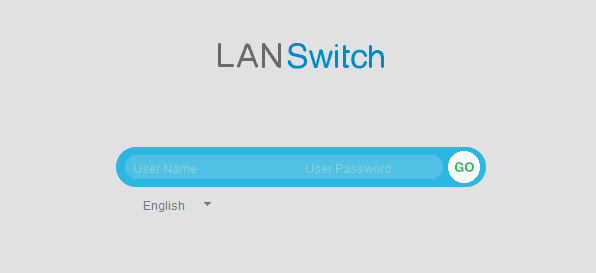
After basic functions of web system login are configured, open the web browser on the PC, enter https://IP address in the address bar, and press Enter. The web system login page then is displayed. As shown in Figure 1, enter the configured web user name and password and select the language of the web system.
- The password change page is displayed the first time you log in to the web system.
- The password change page is also displayed if your password is due to expire or has expired. To access the web system main page, you must change the password.
- For security purposes, a password must contain at least two types of the following: lowercase letters, uppercase letters, digits, and special characters (such as ! $ # %). In addition, the password cannot contain spaces or single quotation marks (').
- If you are logged in as an administrator and the password of the default user admin is admin@huawei.com, the system prompts you to change this password.
Other Configurations for Web System Login
-
Generally, a web page file has been integrated in the system software of a switch and loaded. If you need to upgrade the web page file, log in to the Huawei official website to download a separate web page file and upload it to the switch.
Upload a web page file to the switch.
To obtain a web page file, log in to the Huawei enterprise support website (http://support.huawei.com/enterprise), choose the product model and version, and select a patch version under Public Patch in V and R Version to download the required web page file. The file name is in the format of product name-software version number.web page file version number.web.7z.
Each web page file corresponds to a signature file. The method of downloading the signature file is the same as that of downloading the web page file.
For details about how to load necessary files to a switch, see File Management.
- Load a web page file.
<HUAWEI> system-view
[HUAWEI] http server load web.7z
- Enable the HTTPS service.
[HUAWEI] http secure-server enable //By default, the HTTP IPv4 service function is enabled, and the HTTP IPv6 service function is disabled.
Load a digital certificate and bind an SSL policy to the switch.
- Upload the server's digital certificate and private key file to the switch.
You can upload the server's digital certificate and private key file using SFTP and the digital certificate and private key file are saved in the security directory. If the switch does not have the security directory, run the mkdir security command to create it. For details about how to load necessary files to a switch, see File Management.
After the server's digital certificate and private key file are uploaded, run the dir command in the user view to check whether the sizes of the uploaded server's digital certificate and private key file are the same as those on the file server. If not, an exception may occur during file uploading. You can re-upload the files.
- Create an SSL policy and load a digital certificate. A PEM digital certificate is used as an example here.
[HUAWEI] ssl policy http_server
[HUAWEI-ssl-policy-http_server] certificate load pem-cert 1_servercert_pem_dsa.pem key-pair dsa key-file 1_serverkey_pem_dsa.pem auth-code cipher 123456
[HTTPS-Server-ssl-policy-http_server] quit
- Bind the SSL policy to the switch and enable the HTTPS service.
[HUAWEI] http secure-server ssl-policy http_server
[HUAWEI] http secure-server enable
- View detailed information about the loaded digital certificate.
[HUAWEI] display ssl policy

       SSL Policy Name: http_server
     Policy Applicants: Config-Webs
         Key-pair Type: DSA
 Certificate File Type: PEM
      Certificate Type: certificate
  Certificate Filename: 1_servercert_pem_dsa.pem
     Key-file Filename: 1_serverkey_pem_dsa.pem
             Auth-code: ******
                   MAC:
              CRL File:
       Trusted-CA File:
           Issuer Name:
   Validity Not Before:
    Validity Not After:
- Upload the server's digital certificate and private key file to the switch.
Related Commands
For detailed command description, see Command Reference.
Function |
Command |
Description |
|---|---|---|
Create a local AAA user and set a password for the user. |
local-user user-name password irreversible-cipher password |
By default, the system has a local user whose user name is admin and password is admin@huawei.com.
NOTE:
If you have logged in to a switch through CLI and changed the password of the admin user, use the new password. |
Set the access type of the local AAA user. |
local-user user-name service-type http |
By default, a local user cannot use any access type. |
Set the local user level. |
local-user user-name privilege level level |
By default, the level of the local user admin is 15, indicating an administrator. |
Load a web page file. |
http server load { file-name | default } |
By default, the web page file integrated in the system software has been loaded to switches. |
Create an SSL policy and display the SSL policy view. |
ssl policy policy-name |
By default, no SSL policy is created. |
Bind an SSL policy to a switch. |
http secure-server ssl-policy policy-name |
A default SSL policy is available on an HTTP server. |
Enable the HTTPS service. |
http [ ipv6 ] secure-server enable |
By default, the HTTPS IPv4 service function is enabled, and the HTTPS IPv6 service function is disabled. |
Function |
Command |
Description |
|---|---|---|
Check the validity of a web page file. |
check file-integrity filename signature-filename |
If the check fails, the file cannot be used as the system software, patch file, web page file, or mod file. |
Set a port number of an HTTPS server. |
http [ ipv6 ] secure-server port port-number |
The default port number is 443. |
Set a source interface for an HTTPS server. |
http server-source -i loopback interface-number |
Before setting a source interface for an HTTPS server, ensure that the loopback interface to be specified as the source interface has been created. If not, this command cannot be correctly executed. |
Set the HTTPS session inactivity period. |
http timeout timeout |
By default, the HTTPS session inactivity period is 20 minutes. |
Customize an SSL cipher suite policy. |
ssl cipher-suite-list customization-policy-name |
By default, a switch supports only security algorithms. You can run this command to customize a cipher suite policy. |
Set cipher suites for a customized SSL cipher suite policy. |
set cipher-suite { tls12_ck_dss_aes_128_gcm_sha256 | tls12_ck_dss_aes_256_gcm_sha384 | tls12_ck_rsa_aes_128_gcm_sha256 | tls12_ck_rsa_aes_256_gcm_sha384 } |
By default, no cipher suite is configured for a customized SSL cipher suite policy. The system software does not support the tls12_ck_rsa_aes_256_cbc_sha256, tls1_ck_dhe_dss_with_aes_128_sha, tls1_ck_dhe_dss_with_aes_256_sha, tls1_ck_dhe_rsa_with_aes_128_sha, tls1_ck_dhe_rsa_with_aes_256_sha, tls1_ck_rsa_with_aes_128_sha, and tls1_ck_rsa_with_aes_256_sha parameters. To use the tls12_ck_rsa_aes_256_cbc_sha256, tls1_ck_dhe_dss_with_aes_128_sha, tls1_ck_dhe_dss_with_aes_256_sha, tls1_ck_dhe_rsa_with_aes_128_sha, tls1_ck_dhe_rsa_with_aes_256_sha, tls1_ck_rsa_with_aes_128_sha, or tls1_ck_rsa_with_aes_256_sha parameter, you need to install the WEAKEA plug-in. For higher security purposes, you are advised to use other parameters. |
Set the minimum SSL version of an SSL policy. |
ssl minimum version { tls1.1 | tls1.2 } |
The default minimum SSL version of an SSL policy is TLS1.2. The system software does not support the tls1.0 parameter. To use the tls1.0 parameter, you need to install the WEAKEA plug-in. For higher security purposes, you are advised to specify the tls1.1 or tls1.2 parameter. |
Bind a specified customized SSL cipher suite policy to an SSL policy. |
binding cipher-suite-customization customization-policy-name |
By default, each SSL policy uses a default cipher suite. If the cipher suite in the customized cipher suite policy bound to an SSL policy contains only one type of algorithm (RSA or DSS), the corresponding certificate must be loaded for the SSL policy to ensure successful SSL negotiation. |
Load a PEM digital certificate/certificate chain and specify a private key file. |
|
Only one certificate or certificate chain can be loaded to an SSL policy. (A certificate chain is a list of trust certificates, starting from the device's certificate and ending at the root CA certificate.) If a certificate or certificate chain has been loaded, run the undo certificate load command to unload the old certificate or certificate chain before loading a new one. Select the corresponding configuration based on the certificate type. When loading a PEM certificate or certificate chain, run one of the following commands based on whether a user obtains a digital certificate or certificate chain from the CA. Command 1 is used to load a PEM digital certificate and specify a private key file. Command 2 is used to load a PEM certificate chain and specify a private key file. |
Load an ASN1 digital certificate and specify a private key file. |
certificate load asn1-cert cert-filename key-pair { dsa | rsa } key-file key-filename |
|
Load a PFX digital certificate and specify a private key file. |
certificate load pfx-cert cert-filename key-pair { dsa | rsa } { mac cipher mac-code | key-file key-filename } auth-code cipher auth-code |
|
Force a specified web user to go offline. |
free http user-id user-id |
Currently, the switch supports a maximum of five concurrent online web users. |
Set personalized greeting messages on the web system. |
web welcome-message message |
N/A |
View online web user information. |
display http user [ username username ] |
N/A |