Example for Configuring One-way Frame Delay Measurement in VPLS Networking
This section provides an example showing how to configure one-way frame delay measurement in VPLS networking.
Networking Requirements
As networks rapidly develop and applications diversify, various value-added services, such as Internet Protocol television (IPTV), video conferencing, and Voice over Internet Protocol (VoIP), are more widely used than ever before. Any link connectivity fault or network performance deterioration directly affects service quality on a live network, making performance monitoring on the pipes that transmit these services absolutely essential.
As shown in Figure 1, CFM is configured between each CE and PE and between PEs. To provide high-quality video services, providers hope to monitor the unidirectional delay over mobile bearer links in real time, while monitoring link connectivity. Monitoring the unidirectional delay over mobile bearer links allows the providers to respond quickly to video service quality deterioration.

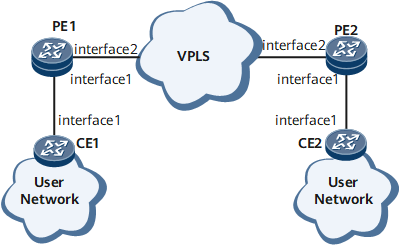
Configuration Roadmap
Configure on-demand one-way frame delay measurement for the PW between the PEs to periodically collect statistics about the delay in frame transmission.
Data Preparation
To complete the configuration, you need the following data:
Configure the name of a VSI and the IP address of the interface of a VPLS.
Configure the names of the MD and MA between PE1 and PE2 and between CE1 and PE1.
Configure the interval at which 1DM messages are sent and the number of times when 1DM messages are sent.
Procedure
- Configure on-demand one-way frame delay measurement for a PW between PEs.
Configure a VPLS connection.
Configure a VPLS connection between PE1 and PE2. The detailed configurations are not provided here. For details, see the chapter "VPLS Configuration" in the HUAWEI NetEngine 8000 F SeriesRouter Configuration Guide - VPN or configuration files in this example.
After completing the configuration, run the display vsi name vsi-name verbose command on each PE to view information about the related VSI and PW.
<PE1> display vsi  name ldp1 verbose
 ***VSI Name               : ldp1
    Administrator VSI      : no
    Isolate Spoken         : disable
    VSI Index              : 1
    PW Signaling           : ldp
    Member Discovery Style : static
    Bridge-domain Mode     : disable
    PW MAC Learn Style     : unqualify
    Encapsulation Type     : vlan
    MTU                    : 1500
    Diffserv Mode          : uniform
    Service Class          : --
    Color                  : --
    DomainId               : 255
    Domain Name            :
    Ignore AcState         : disable
    P2P VSI                : disable
    Create Time            : 0 days, 0 hours, 10 minutes, 10 seconds
    VSI State              : up

    VSI ID                 : 1
   *Peer Router ID         : 1.1.1.1
    primary or secondary   : primary
    ignore-standby-state   : no
    VC Label               : 4187
    Peer Type              : dynamic
    Session                : up
    Tunnel ID              : 0x0000000001004c4b42
    Broadcast Tunnel ID    : --
    Broad BackupTunnel ID  : --
    CKey                   : 1
    NKey                   : 2281701546
    Stp Enable             : 0
    PwIndex                : 1
    Control Word           : enable

    Interface Name         : GigabitEthernet0/1/1.1
    State                  : up
    Access Port            : false
    Last Up Time           : 2013/02/21 08:44:46
    Total Up Time          : 0 days, 0 hours, 0 minutes, 14 seconds

  **PW Information:

   *Peer Ip Address        : 1.1.1.1
    PW State               : up
    Local VC Label         : 4187
    Remote VC Label        : 4187
    Remote Control Word    : enable
    PW Type                : label
    Tunnel ID              : 0x0000000001004c4b42
    Broadcast Tunnel ID    : --
    Broad BackupTunnel ID  : --
    Ckey                   : 1
    Nkey                   : 2281701546
    Main PW Token          : 0x0
    Slave PW Token         : 0x0
    Tnl Type               : ldp
    OutInterface           : LDP LSP
    Backup OutInterface    : --
    Stp Enable             : 0
    PW Last Up Time        : 2013/02/21 08:44:46
    PW Total Up Time       : 0 days, 0 hours, 0 minutes, 14 seconds
Configure basic Ethernet CFM functions and specify the MEP type as inward.
Configure basic Ethernet CFM functions on each PE. Specify the Ethernet CFM protocol in the version of IEEE Standard 802.1ag-2007. Create an MD named md1 and an MA named ma1, and bind the MA to the VSI.
# Configure PE1.
<HUAWEI> system-view
[~HUAWEI] sysname PE1
[*HUAWEI] commit
[~PE1] cfm enable
[*PE1] cfm md md1
[*PE1-md-md1] ma ma1
[*PE1-md-md1-ma-ma1] map vsi ldp1
[*PE1-md-md1-ma-ma1] mep mep-id 1 interface gigabitethernet0/1/1.1 inward
[*PE1-md-md1-ma-ma1] mep ccm-send mep-id 1 enable
[*PE1-md-md1-ma-ma1] remote-mep mep-id 2
[*PE1-md-md1-ma-ma1] remote-mep ccm-receive mep-id 2 enable
[*PE1-md-md1-ma-ma1] quit
[*PE1-md-md1] quit
# Configure PE2.
<HUAWEI> system-view
[~HUAWEI] sysname PE2
[*HUAWEI] commit
[~PE2] cfm enable
[*PE2] cfm md md1
[*PE2-md-md1] ma ma1
[*PE2-md-md1-ma-ma1] map vsi ldp1
[*PE2-md-md1-ma-ma1] mep mep-id 2 interface gigabitethernet0/1/1.1 inward
[*PE2-md-md1-ma-ma1] mep ccm-send mep-id 2 enable
[*PE2-md-md1-ma-ma1] remote-mep mep-id 1
[*PE2-md-md1-ma-ma1] remote-mep ccm-receive mep-id 1 enable
[*PE2-md-md1-ma-ma1] quit
[*PE2-md-md1] quit
Configure the test instance.
# Configure PE1.
[*PE1] cfm md md1
[*PE1-md-md1] ma ma1
[*PE1-md-md1-ma-ma1] test-id 1 mep 1 remote-mep 2 peer-ip 1.1.1.1
[*PE1-md-md1-ma-ma1] commit
# Configure PE2.
[~PE2] cfm md md1
[*PE2-md-md1] ma ma1
[*PE2-md-md1-ma-ma1] test-id 1 mep 2 remote-mep 1 peer-ip 2.2.2.2
[*PE2-md-md1-ma-ma1] commit
Configure the DMM reception function on PE2.
# Configure PE2.
[~PE2-md-md1-ma-ma1] delay-measure one-way receive test-id 1
[*PE2-md-md1-ma-ma1] commit
[~PE2-md-md1-ma-ma1] quit
[~PE2-md-md1] quit
Enable on-demand one-way frame delay measurement for the PW on the VPLS network.
# Configure PE1.
[~PE1-md-md1-ma-ma1] delay-measure one-way send test-id 1 interval 1000 count 20
[~PE1-md-md1-ma-ma1] quit
[~PE1-md-md1] quit
Verify the configuration.
Run the display y1731 statistic-type command on PE2 to view the statistics about the delay in unidirectional frame transmission.
<PE2> display y1731 statistic-type oneway-delay test-id 1
Latest one-way delay statistics of test-id 1:
--------------------------------------------------------------------------------
Index    Delay(usec)    Delay variation(usec)
--------------------------------------------------------------------------------
    1            531                        -
    2            423                      108
    3            527                      104
    4            327                      200
    5            456                      129
    6            481                       25
    7            342                      139
    8            463                      121
    9            642                      179
   10            677                       35
   11            507                      170
   12            511                        4
   13            510                        1
   14            557                       47
   15            489                       68
   16            403                       86
   17            498                       95
   18            508                       10
   19            513                        5
   20            591                       78
   21            490                      101
   22            468                       22
   23            514                       46
   24            393                      121
   25            509                      116
   26            516                        7
   27            662                      146
   28            571                       91
   29            383                      188
   30            545                      162
   31            421                      124
   32            612                      191
   33            645                       33
   34          75642                    74997
   35            594                    75048
   36            500                       94
   37            394                      106
   38            499                      105
   39            330                      169
   40            420                       90
   41            513                       93
   42            560                       47
   43            564                        4
   44            647                       83
   45            549                       98
   46            372                      177
   47            473                      101
   48            452                       21
   49            617                      165
   50            589                       28
   51            496                       93
   52            386                      110
   53            499                      113
   54            374                      125
   55            540                      166
   56            531                        9
   57          75535                    75004
   58            637                    74898
   59            360                      277
   60          75524                    75164
--------------------------------------------------------------------------------
Average delay(usec) :        4254    Average delay variation(usec) :       6446
Maximum delay(usec) :       75642    Maximum delay variation(usec) :      75164
Minimum delay(usec) :         327    Minimum delay variation(usec) :          1
Configuration Files
PE1 configuration file
#
 sysname PE1
#
 cfm version standard
 cfm enable
#
 mpls lsr-id 2.2.2.2
 mpls
#
 mpls l2vpn
#
mpls ldp
#
vsi ldp1 static
 pwsignal ldp
  vsi-id 1
  peer 1.1.1.1
#
mpls ldp
#interface GigabitEthernet0/1/1.1
 vlan-type dot1q 2
 l2 binding vsi ldp1
#
interface GigabitEthernet0/1/2
 undo shutdown
 ip address 10.1.1.1 255.255.255.0
 mpls
 mpls ldp
#
interface LoopBack0
 ip address 2.2.2.2 255.255.255.0
#
ospf 1
 area 0.0.0.0
  network 2.2.2.2 0.0.0.0
  network 10.1.1.0 0.0.0.255
#
cfm md md1
 ma ma1
  map vsi ldp1
  mep mep-id 1 interface GigabitEthernet0/1/1.1 inward
  mep ccm-send mep-id 1 enable
  remote-mep mep-id 2
  remote-mep ccm-receive mep-id 2 enable
  test-id 1 mep 1 remote-mep 2 peer-ip 1.1.1.1
#
return
PE2 configuration file
#
 sysname PE2
#
 cfm enable
#
 mpls lsr-id 1.1.1.1
 mpls
#
 mpls l2vpn
#
vsi ldp1 static
 pwsignal ldp
  vsi-id 1
  peer 2.2.2.2
#
mpls ldp
#
interface GigabitEthernet0/1/1.1
 vlan-type dot1q 2
 l2 binding vsi ldp1
#
interface GigabitEthernet0/1/2
 undo shutdown
 ip address 10.1.1.2 255.255.255.0
 mpls
 mpls ldp
#
interface LoopBack0
 ip address 1.1.1.1 255.255.255.0
#
ospf 1
 area 0.0.0.0
  network 1.1.1.1 0.0.0.0
  network 10.1.1.0 0.0.0.255
#
cfm md md1
 ma ma1
  map vsi ldp1
  mep mep-id 2 interface GigabitEthernet0/1/1.1 inward
  mep ccm-send mep-id 2 enable
  remote-mep mep-id 1
  remote-mep ccm-receive mep-id 1 enable
  test-id 1 mep 2 remote-mep 1 peer-ip 2.2.2.2
  delay-measure one-way receive test-id 1
#
return